
Business Phone Systems for Medical & Dental Offices
PeachComm gives medical and dental offices a cloud phone system that greets every patient, routes each call to the right person, and keeps your team reachable at the front desk, in the back office or on the go. It's HIPAA-ready, and we configure the security settings with you.

Problems we solve for medical and dental offices
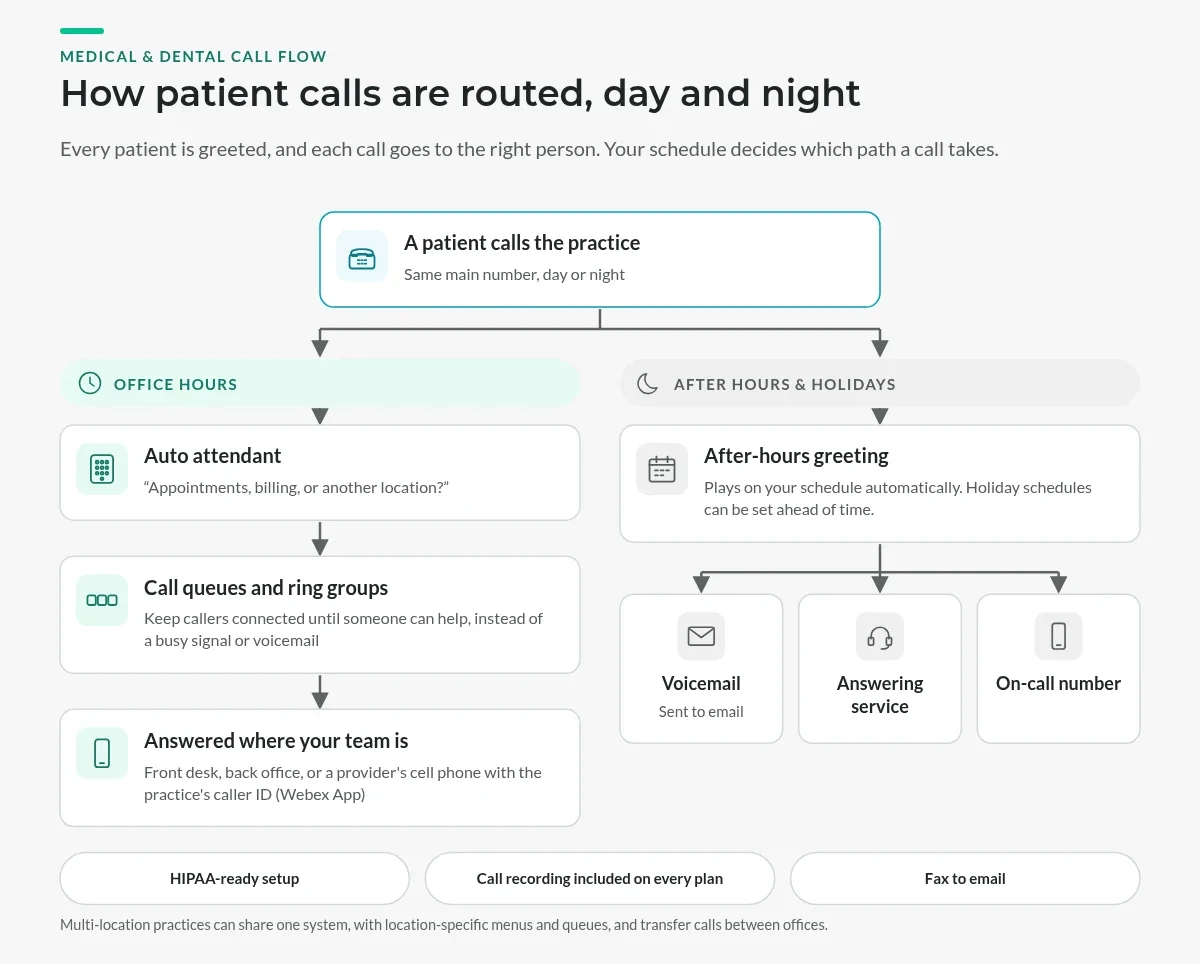
- Missed patient calls. When the front desk is checking someone in, the next caller often hears a busy signal or voicemail and may book somewhere else. Call queues and ring groups keep those callers connected until someone can help.
- After-hours routing. Patients call before you open, over lunch and after you close. Scheduled greetings send them to voicemail, an answering service or an on-call number automatically, including on holidays.
- A front desk doing three jobs. Check-in, insurance questions and scheduling all compete with a ringing phone. An auto attendant handles the first question ("appointments, billing, or another location?") so staff can focus on the patient in front of them.
- More than one location. Multi-location practices need one system where calls can move between offices without patients calling a second number.
HIPAA-ready, set up for your practice
Calls are encrypted in transit, and Webex Calling has been independently assessed against the HIPAA Security Rule. Your phone system supports HIPAA compliance once the right settings are on: voicemail PINs, strong sign-in rules, and limits on who can record and listen to calls. We configure them with you. Learn more about our HIPAA compliant phone system.
Ask us about Business Associate Agreements (BAAs).
What you get
- Webex Calling for the whole practice. Every team member gets a business line on a desk phone, computer or smartphone, with auto attendant, call queues, hunt groups, music on hold, and visual voicemail with voicemail to email. Providers can use the Webex App on their cell phones and show the practice's caller ID instead of a personal number.
- Call recording, included. Webex Call Recording is included on every plan for training and quality review. Recording laws vary by state, and some require every party's consent, so your office is responsible for any notice.
- Fax to email. Referrals and records arrive in your inbox instead of on a shared fax machine. Fax to Email
- Copper line replacement. Still paying for copper lines for an alarm panel or a fax machine? We replace them with a cellular device with battery backup. POTS line replacement
- AI Receptionist* (add-on). Answers routine calls and helps direct callers, giving your front desk some breathing room.
- Attendant Console* (add-on) for receptionists who handle a lot of calls and need to see and transfer them quickly.
- Phones for every station. Cisco desk and DECT cordless phones, plus Cisco-certified Poly and Yealink phones. Cordless handsets work well for hygienists and assistants who move between rooms. Browse phones
*Additional charges apply.
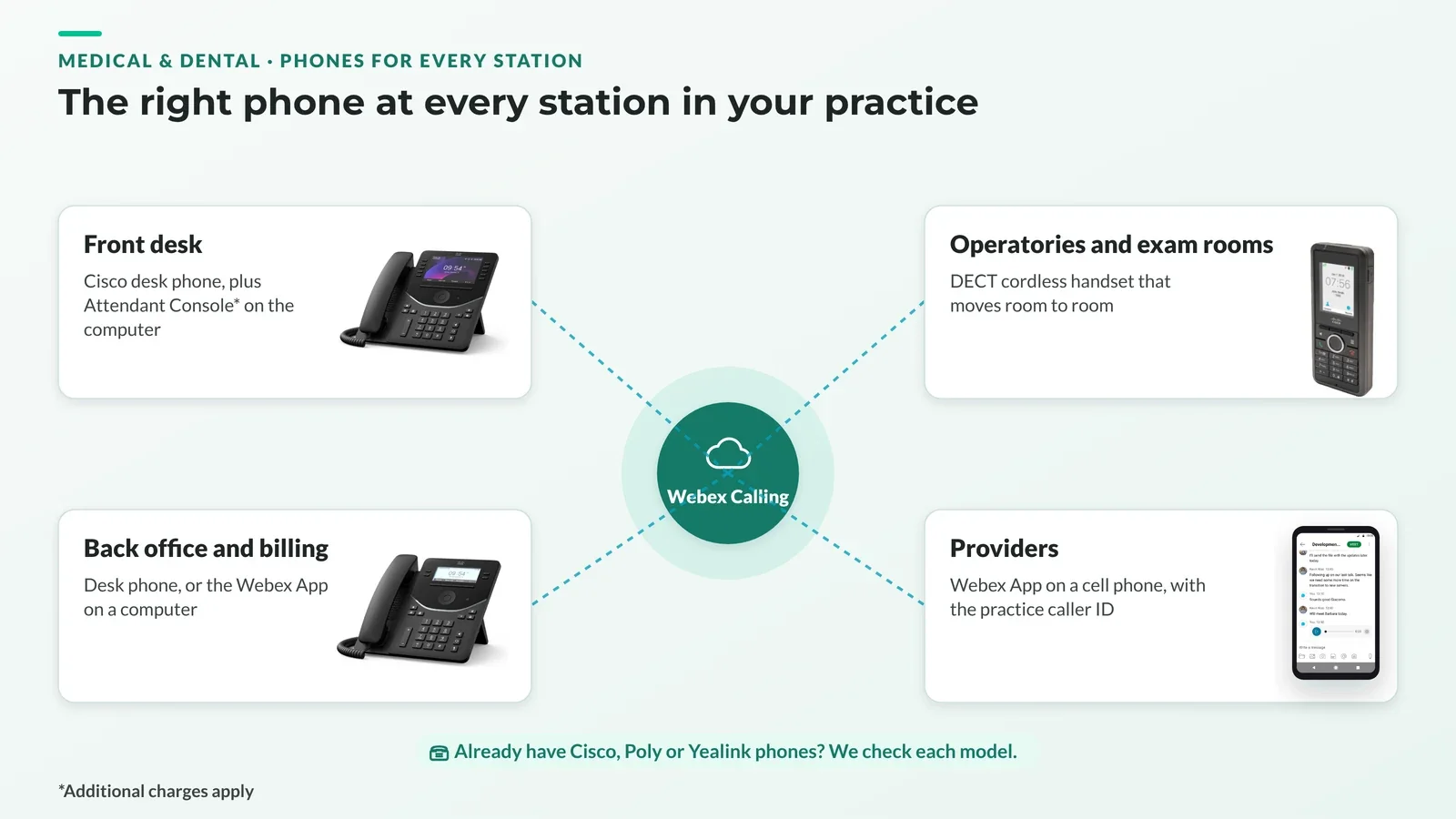
Already have desk phones? If your Cisco, Poly or Yealink phones are on our supported phones list, we can likely convert them to work on PeachComm, so you may not need new phones. Some phones need a software update or a conversion first, and older models may need to be replaced. We'll check each model before you switch.
How switching works
- We port your numbers, so patients keep calling the numbers on your website, cards and reminder materials.
- We set up your system. We build your call flow with you (greetings, menus, after-hours schedules, queues, phones and HIPAA settings) and test it before go-live.
- We help your team go live. We train your staff and stay available after launch. Most support is remote, and an on-site technician is available if you ask.
Plans for practices of every size
- Basic: $24/user/month. Calling, auto attendant, queues, visual voicemail and the Webex App. A good fit for front desk, operatory and exam-room phones.
- Standard: $34/user/month. Adds team messaging and meetings for up to 100 people.
- Premium: $39/user/month. Adds meetings for up to 1,000 people and cloud meeting recording.
- Customer Assist: quoted. For dedicated scheduling or patient-access teams.
Mix plans on one account. Compare all plans
How it works
Example: A front desk that stops missing patient calls
A dental office's front desk couldn't answer the phone while checking patients in. PeachComm ported the office's numbers and set up a call queue and ring group, so the next caller holds instead of hitting voicemail. Scheduled greetings route before-hours, lunch, after-hours and holiday calls to voicemail, an answering service or an on-call number automatically. Everything was tested before go-live, and the staff was trained on the new phones.
Example: HIPAA settings turned on at setup
A medical practice wanted its phone system set up to support HIPAA compliance. During setup, PeachComm configured the settings with the practice: 6+ digit voicemail PINs with lockout, strong sign-in rules with multi-factor authentication, limits on who can record and listen to calls, and limits on who can see call history and voicemail. Webex Calling is HIPAA-ready when these settings are on; the practice stays responsible for its own compliance.
These are typical examples.
Medical & dental phone system FAQs
Is your phone system HIPAA compliant?
It's HIPAA-ready. Calls are encrypted in transit, and Webex Calling has been independently assessed against the HIPAA Security Rule. Compliance also depends on settings like voicemail PINs, sign-in rules and recording access, which PeachComm configures with your practice.
Can we keep our current office phone numbers?
Yes. PeachComm handles number porting and coordinates the timing so your switchover is as smooth as possible.
How do after-hours and holiday calls work?
You set the schedule. After hours, the auto attendant can play a separate greeting and send callers to voicemail, an answering service or an on-call phone. Holiday schedules can be set ahead of time.
Can our providers take calls on their cell phones?
Yes. With the Webex App, providers can make and take calls on their mobile phones using the practice's caller ID, so their personal numbers stay private.
Can several offices share one system?
Yes. Multi-location practices can share one system with location-specific menus, queues and extensions, and staff can transfer calls between offices.
How does 911 work with a cloud phone system?
PeachComm helps you set up emergency calling and register the right address for each location. Your practice is responsible for keeping those addresses accurate, especially if phones or staff move.
Get a quote for your practice
Tell us how many people answer phones and what you use today. We'll recommend a setup with clear pricing.
Please don't include patient information when you contact us.